
Appearance
Marketing Automation
The Marketing Automation menu contains the subitems Overview and Trigger Log.
Overview
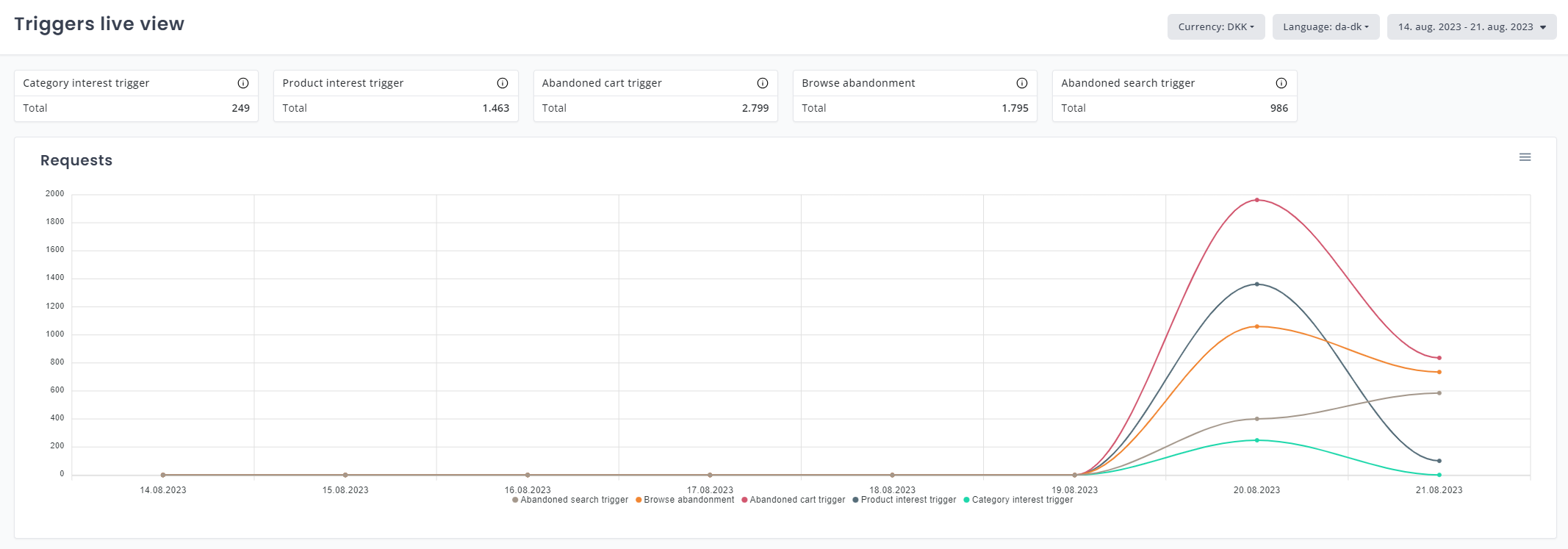
On the Overview page, Relewise graphs the trigger types that have been registered as active on your site. The graph is accompanied by a counter above it, which tracks the total amount of each trigger type events, as well as the actual live view below the graphs. The live view, similar to that found on the Behavioral Trackings page, is only able to show data since you began your current session in My Relewise, and will cease to update after ten minutes of inactivity.
Trigger Log
The Trigger Log page lists trigger executions and lets you filter by configuration, user, and response status.
Use these filters:
- Trigger Configuration to narrow the log to one configuration.
- Term to search for users.
- HTTP Response Status to filter by status code.
- Show only faulted triggers to focus on executions with errors.
The list shows Created, Configuration, HTTP Response Status, and Duration. Select a row to expand the execution details.